

Writing a review sounds simple until the blank page appears. You know whether you liked the movie or show, but how do you explain why without retelling the plot? How do you verify names and still write something searchable?
Accuracy matters. As of June 2026, IMDb listed more than 30.3 million titles, including movies, series, episodes, and shorts.
The good news? You do not need an expensive setup. Below are the best tools for writing movie and TV reviews.
Here’s What’s Inside
- Tools for recording reactions and organizing research
- Databases for checking credits and release details
- Editors that improve grammar and readability
- SEO tools for choosing stronger review angles
1. Letterboxd for First Impressions
Letterboxd combines a viewing diary, ratings, reviews, tags, watchlists, and custom lists. It is ideal for recording reactions before they become vague or get influenced by other people’s opinions.
After watching a film, log three notes:
- The strongest scene or performance
- The biggest weakness
- The feeling or question that stayed with you
Those observations often become the review’s central argument.
If you use AI to brainstorm headlines or organize notes, keep your analysis at the center. You may run the draft through a chatgpt detector to flag formulaic passages, but never treat one score as proof of authorship. Research published through the ACL Anthology found that AI-text detectors can perform poorly in realistic settings.

Letterboxd is film-focused, so episode reviewers may prefer a separate notes database.
2. IMDb for Fact-Checking
A misspelled actor’s name or incorrect episode number immediately damages trust. IMDb is a useful starting point for checking cast and crew credits, release dates, genres, alternate titles, and production details. Its advanced search can also help distinguish between similarly named productions.
Before publishing, confirm:
- Full title and release year
- Director, creator, and main cast
- Character names
- Season and episode numbers
- Runtime and release platform
IMDb ratings show audience voting patterns, not objective quality. Your review should explain how the storytelling, performances, direction, visuals, and sound work. Verify quotations, budgets, and disputed claims with an additional primary source.
3. JustWatch for Streaming Availability
Readers often want to know where they can watch a title. JustWatch helps identify streaming, rental, and purchase options across different services.
Add a short availability note, especially for older or international titles. Include the country and date checked because streaming rights change. “Available on Netflix” is vague; “Available on Netflix in the United States when checked in August 2026” is useful.
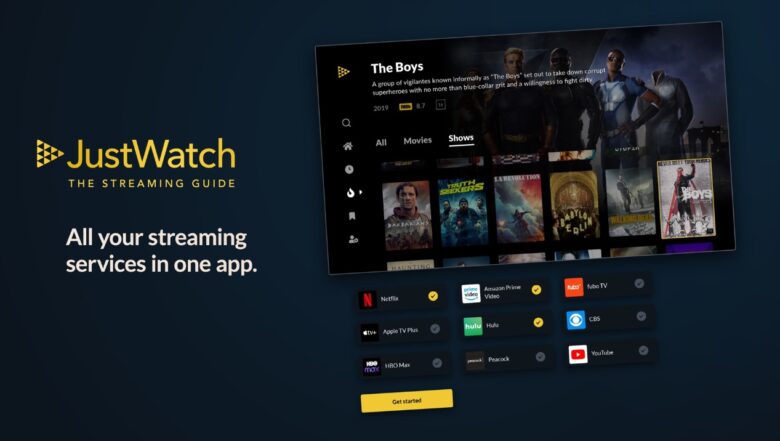
JustWatch also publishes daily streaming charts based on activity from more than 60 million monthly users. These charts can help you spot titles attracting current attention, although popularity should never replace editorial judgment.
4. Notion or Obsidian for Organized Notes
Regular reviewers need more than random documents. Notion works well as a visual database, while Obsidian suits writers who prefer private notes stored locally and connected through internal links.
Create one reusable review template with fields for:
- Title, year, genre, and platform
- Viewing date and rating
- Main argument
- Important scenes
- Spoiler level
- Review status
- Target keyword
Notion’s database templates make this structure easy to repeat, and its Web Clipper can save interviews or reference pages.
Pick one system. Running both usually creates duplicate work.
5. Google Docs for Drafting
Google Docs is practical because it is easy to share, comment on, and revise. Version history lets writers inspect earlier changes, which is useful when an edit accidentally removes a strong idea or changes the meaning of a paragraph.
Voice typing can break writer’s block. Explain the movie to a friend, then shape the transcript into an introduction. Google provides voice typing and voice commands in supported browsers.
Draft first and edit second. Constant correction can flatten your voice.
6. Grammarly or LanguageTool for Proofreading
Grammarly offers suggestions for grammar, clarity, tone, structure, and word choice. LanguageTool checks spelling, punctuation, grammar, and style across multiple languages.
Both can catch:
- Repeated words
- Missing punctuation
- Awkward phrasing
- Inconsistent tone
- Basic typing errors
The warning? Do not accept every suggestion automatically. Film criticism often uses humor, fragments, unusual rhythm, and personal phrasing. A technically “cleaner” sentence may sound less like you.
Use automated feedback as a second opinion, not a command.
7. Hemingway Editor for Clearer Reviews
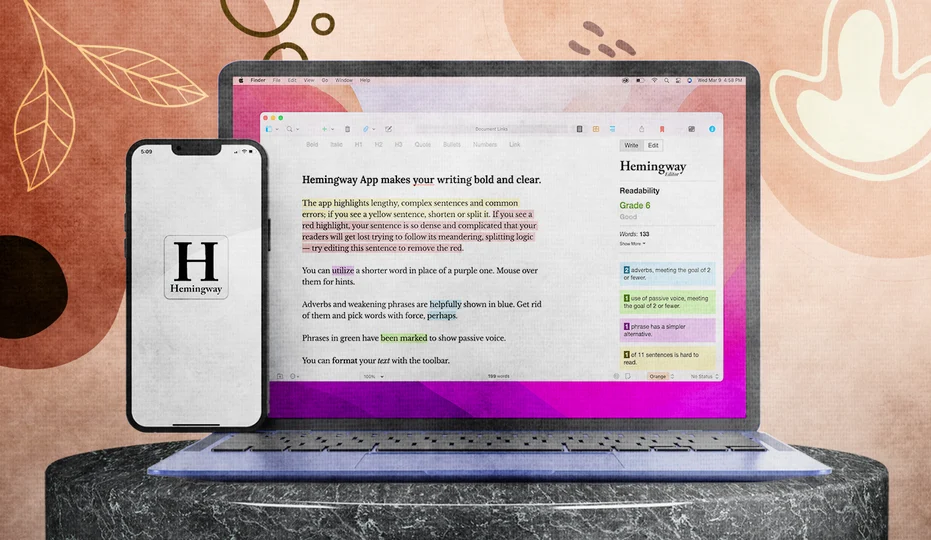
Hemingway Editor highlights difficult sentences and provides readability information. Its default guidance targets roughly a ninth-grade reading level.
Paste in the completed draft and inspect long passages about themes, plot mechanics, franchise history, or filmmaking choices. Do not remove every highlight. Simplify only where several ideas compete inside one sentence.
Clear writing makes your reasoning visible.
8. Google Trends for SEO-Friendly Angles
Google Trends helps compare search interest, explore regional differences, and discover related searches. Writers can compare up to eight groups of terms, which is useful when choosing between “movie review,” “ending explained,” “cast,” or a title-specific question.
Check Trends before drafting. A series may attract more interest around its ending, true-story background, or renewal status than around a generic review phrase. Choose only angles your article genuinely answers.
Remember that Trends data is normalized, not raw search volume. Use it to compare interest, not to claim an exact number of monthly searches.
Use a Repeatable Review Template
Let’s make the process practical. A useful structure is:
- Opening verdict: State the main strength, weakness, or argument.
- Brief context: Identify the genre, creator, and premise.
- What works: Discuss performances, writing, direction, visuals, or sound.
- What falls short: Explain problems with specific examples.
- Who will enjoy it: Identify the likely audience.
- Final assessment: Return to the opening argument and give a recommendation.
Keep plot summary under control. Readers can find a synopsis anywhere. They come to a review for interpretation and judgment.
For TV coverage, clearly state whether you watched one episode, part of the season, or the complete season. That small detail strengthens credibility.
Final Recap
The best tools for writing movie and TV reviews remove friction without replacing your taste or judgment. Letterboxd captures reactions, IMDb verifies details, JustWatch adds viewing context, Notion or Obsidian organizes research, and editing tools improve clarity.
Start with one or two manageable actions. Record three observations after your next viewing, then verify every proper name before publishing. Add a readability or SEO step only after those habits become automatic.
A better review process does not need to feel complicated. It simply needs to help your real opinion reach the page clearly.